Pages

Showing posts with label Microsoft. Show all posts

Sunday, June 15, 2014

Microsoft Word 5.5 ... for DOS

    Microsoft Word 5.5 was released sometime ago. It was supposed to be a Y2K fix, just an update really. What Microsoft did instead was release the entire application for download with no restrictions, for free.

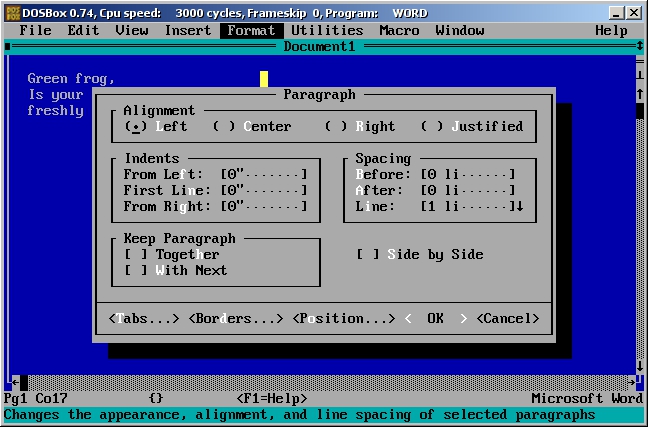
    As you can see, there really isn't much to it. So why would anyone in their right mind want to use 25 year old software? They wouldn't. However, most writers of fictions are probably not in their right mind, otherwise they would be accountants or something else with a stable pay check. For writers of fiction, this could be something great. 

    Word for DOS can be run in a program call "DOSBox". It can also be run in a Virtual Machine that is running DOS. These options would, on the surface anyway, seem to give you some advantages. You could enjoy sharing folders with a much newer operating system such as Windows 8, Ubuntu or even osX. You could have multiple copies open at the same time, each in its own window, doing its own thing. You could have research right along side what you are writing about. 

    But every major word processor for every new operating system, already does all that. So why use an antiquated version that is no longer supported? It is the ultimate in distraction free writing, that's why. 

    The best way to use Word for DOS, is by running DOS. Booting your computer into DOS forces you to use one application at a time. No task switching. Also, no interruptions by Facebook or email programs. 

    Of course, you probably don't have a floppy drive installed and booting from a live cd sounds good, until you need to save what you are writing. So what then is there to do? Create a bootable USB stick. Amazingly, SD Cards also work for this. In an upcoming post I will walk you through creating such a thing, and even provide a downloadable image you can use to create your own. 

    Once you boot into DOS, you will get a simple command prompt. Just type the word "word" and you are in. There is no font selection, there is only one font, pica. Even then that is the "printed" font. The font you see is called "system" and it is a fixed width font. 

    You can change some colors, and I suggest you do. You may be staring at this screen a lot. All I changed was the background to black, the rest I left alone. Play around with them for a while to get a feel for how it looks and works for you and your taste. 

    The point of such a simple interface is simple. Content creation. You are not publishing you work yet. You haven't even written it yet. You are not setting type face, margins, or any of that. It doesn't matter one little bit. The idea is to get as simple as possible so you can focus completely on the task of putting words to page. Nothing more, nothing less. Just writing. 

    Don't let the all this simplicity fool you though. Word 5.5 for DOS is very capable. It actually has "Windows" of sorts for working with multiple documents, a customizable dictionary and thesaurus. It also doesn't auto-replace or auto-correct anything nor does it auto-capitalize anything. This is a good thing if you are trying to use elvish words in your writing. 

    When you're done with your document, you can save it in one of two formats: RTF and DOC. So far I have opened RTF files in Word 2011 for Mac, Word Viewer for Windows, and Wordpad for Windows all without problems. The problem is the DOC format. If you have Windows and Microsoft Word for Windows you are golden. Simply download the converter and install it. The instructions are inside the self extracting archive. This, however, does not work for Word for Mac. Really though, for writing fiction, how much formatting do you need beyond what RTF will handle? These RTF files also import nicely into Word 2011 for Mac and into Scrivener. 

    If you are looking for the ultimate in distraction free writing, give Word for DOS a try. Really, what have you got to loose? 

Until next time ... 

Game of Operating Systems

    I know I know. I really need to make updates to this blog a lot more regularly. However, it has been a bit crazy at my house. I won't go into details here about all of it. What I will go into details about is George R. R. Martin, the creator of Game of Thrones and what he uses to write.

    Back on May 14th the interwebs were all a buzz because Mr. Martin said he still used a DOS machine and a DOS word processor called Word Star to create all of his works. Why would someone do that? Before we get into that, first I suppose I should let you know what DOS is.

    I grew up on Microsoft DOS, which is an acronym for "Disk Operating System". It is command line only, single use only and is very limited in what it can do. It is still in use today. "IF" you have a floppy drive, or if you so choose you can get a USB floppy drive and create a startup disk from within windows. This disk will run a stripped down version of the previous editions of DOS. It can be handy for flashing your BIOS, system rescue, or just because you can.

    Now, just because I said DOS is limited, doesn't mean it isn't capable. It actually has some features that you can't get in a modern version of anything from Microsoft, such as the "UNDELETE" command. That's right, you used to be able to recover accidentally deleted files. It actually works quite well. Even though it was command line only, that didn't stop developers from making graphical shells for DOS, or even games. DOOM, Castle Wolfenstien, all of the classic greats in fact were written for DOS.

    Another advantage of running DOS is stability. You can run a DOS for months, even years without a system crash. The fact is, without all of the overhead of a GUI, and the various drivers from different manufactures, that vary widely in quality, DOS is rock solid. You would be very hard pressed to break it.

    Speed is another advantage. Think about it. This Operating System was designed to be fast on a 25 year old processor. On a new system it is blazing. Even the cheapest, used, laptop you can pickup today will run it with no problem at speeds that are much faster that it was designed to run at. When you press a key, stuff happens. It's just fast.

    Finally, security. How many people today run DOS? Not many. That means for the most part your files are secure, because none of the modern software can read your document format. Most of the virus's and malware written today are written in Java. There is no Java for DOS.

    However, it is more than 25 years old, and does have its limitations. Such as a 2 Gigabyte limit on Hard Drive Size. Being limited to only the first 64 Megabytes of Ram, not that you'll ever need more than that in DOS. Hardware support is also extremely limited and you won't be able to access a Hard Drive that is formatted for NTFS (such as your windows install) without additional software.

    Now before you go on a rant about these limitations, keep in mind that I am talking about real DOS. Not the stripped down version that is to help you recover windows. Starting with Windows 95, DOS became version 7.0 and with each new iteration Microsoft has stripped more and more of it away because it simply isn't needed anymore. The last "REAL" version of DOS, one with all of the utilities and functionality you would ever need from a command line Operating System was Version 6.22, and is in my opinion one of the greatest Operating Systems to ever exists.

    If you want to try DOS for yourself, you can sometimes find copies on floppy disk at the local thrift store, or if you can google for the disk images, although that may lead to legal questions. Your morality is your own.

    As for Word Star and Mr. Martin? Well, as it turns out, Official Copies of Word Star are actually hard to come by, and with good reason. The people that still use Word Star are nearly as fanatical about it as Mac users are about Apple. You can still purchase a copy, which I would recommend if you really want to use it. However, a long time ago Microsoft released Microsoft Word for DOS 5.5 for free. It is still available for download and works very well.

    If you do use Microsoft Word for DOS, keep in mind that modern version of Word cannot read the documents you creates unless you save them RTF format. The original DOC format is no longer supported by Microsoft, though I have heard you can get a converter file. I have yet to test it.

    In my next post, I will go into more details about Microsoft Word 5.5 and why it could be a solution for some.

    Until next time ... 

Sunday, September 2, 2012

The future of the PC

    This post is all about the current state of personal computer. Recently windows domination slipped a few factions of a percentage point, but does it really mean anything to the average user? Does anyone other than the geeks really care? The answer to both of these is probably a big fat "not really". But it is the geeks, nerds and tech-heads that shape and define the digital world for the average user, so perhaps its only fitting that the architects of the future care more than its tenets.

Sunday, June 17, 2012

XFDL on a Mac ... has finally arrived!


    Yes, its finally here! PureEdge 6.5 is the older MicroSoft Windows software that was used to read and write XFDL files. The updated version is the IBM Lotus Forms Viewer.

Sunday, May 20, 2012

AirPrint from any printer

    A few days ago I started to look for ways to print from iPhone 4S. I am not really sure why, it just seemed like something I should be able to do. As it turns out Apple want's you to use only those printers that support "AirPrint". As with everything Apple related, there is always another way. I found two.

Sunday, May 13, 2012

XFDL Viewer for Mac

    If you have read my previous posts on XFDL, then you know that I have been working on an XFDL viewer for the Apple Mac. I have hit, yet again, some snags. Reverse engineering software is not only wrong, but it also illegal. However, reverse engineering a file type isn't, but that doesn't make it easy.

Sunday, March 25, 2012

Bloatware inside of documents ...

    In my last post, I had the idea of revisiting an old project. I had forgotten just how bloated an XFDL file really is. I have spent most of the day working on refining my progress so far and making sure the stage is set for parts of the software that are not yet written. Basically, I spent the day planning and digging through the XML file contained within. I had forgotten just how bad it was in there.

XFDL Viewer for Mac

    Today I decided to revisited a project that I had dropped almost a year ago; to write an XFDL viewer for Mac osX. The last time I tried this, it was a disaster. The forms sort of exploded all over the window and being unfamiliar with RealStudio, I was unable to figure out control arrays. Basically, when ever I opened  a second form, it would also write all of that data onto the first one. It as a less than stellar first attempt.

Friday, March 16, 2012

How to add files plex media server on ubuntu 11.10

    It occurred to me, while reviewing some of my previous posts, that I haven't yet covered some very basic "to-do's" about the Plex Media Server. So this post will cover, among other things, how to add files to the Plex Library on Linux.

Tuesday, March 13, 2012

Ubuntu Media Server ... whats next?

    If you have been following my blog, then you already know that I use Ubuntu 11.10 and the Plex media server software as a "Media Center PC". The Ubuntu PC also functions as file server and has two 500GB partitions for Time Machine Backup from my two Mac's. I have also managed to get Netatalk 2.2.2 and Avahi to play nice with the default Samba file sharing software. I wanted to keep Samba available for when friends with Microsoft Windows laptop's came to visit.

    So far, this setup has been working out much better than expected. The server (which is really just plain Jane Ubuntu 11.10 for desktops) is more stable than I could have hoped for and everything integrates well enough into my network that even my "non-techie" wife can use it regularly from her Mac or from the Roku without any trouble. The real question is, where do I go from here?

Sunday, March 11, 2012

Practical Linux ... just my thoughts

    Ever since the early 90's, when I built my first Salckware Linux distribution from source code I have been fascinated with the idea of a free, open-source operating system. When you consider the very idea of an entire planet of free thinking people all coming together, without pay, to make something truly great it staggers the mind. That is, until you really get to the nuts and bolts of it.

Saturday, February 25, 2012

Your smart phone may be your new PC

This is not going to be your typical rundown of who has what, or who does this or that better. No, this is something a bit less ... tangible. It is time for some speculation. Specifically, is Android poised to wipe the virtual walls of the internet with iOS?


Friday, December 30, 2011

Teaching yourself to write software

    I have been programming off and on again for around twenty years now. There is just something that I really find exciting about making a machine do exactly what I tell it to do. Of course that is often a problem as well. A computer cannot guess at your intentions or motives. Right or wrong, it will do exactly what it is told, nothing more. For the most part, my experience has been primarily in Microsoft Windows.

Thursday, December 22, 2011

I am so done with Windows

    I got up early this morning thinking I was going to have a really good day. Yes it was raining and a bit chilly, but it was also the start of my five day weekend. Longest paid weekend I have ever had, I love the holidays.

    Before the clock showed seven this morning I got a call from a frantic co-worker. Apparently he inadvertently installed a driver for a keyboard with the wrong language for yet another co-worker. At this point I should mention his job is working on Windows based computers. The normal solution is of course, just uninstall the driver and install the correct version. Of course if was that simple I wouldn't have anything to blog about.

    The uninstaller removed the files but not the registry entries. Now every time he tries to install the correct drivers it just asks him to uninstall the old one first. He even tried to re-install the first set of drivers in an attempt to re-run the uninstaller again. Now he has to spend his day manually scanning and searching through thousands of registry entries in an attempt to find the one that is holding things up. I do not envy him at all.

    I have been in his position many times and I remember the countless hours of frustration and stress I spent on various Windows machines trying to get something to work the way it was suppose to. Driver issues are probably the worst. This is especially true when working with hardware from a smaller, less-known company that may or may not have the best quality driver programmers at their disposal. These smaller companies usually cannot afford to offer the best support and the user base is either nonexistent for help or so overly technical that any help they may offer is rendered useless.

    While I do pity my co-worker and I do genuinely feel bad for him, I can't help but look upon this as a reminder as to why I switch to a Macintosh. I have not had to restart my computer (as of this writing) for 11 days and 19 hours. Not too bad. While I do not consider myself an Apple "FanBoy" (I love my Android phone) I do really like the fact that my computer just works.

    I hope my co-worker can fix the problem and get his friends computer working before the weekend starts. I am just glad that, for once, its not me in the hot seat.

Saturday, December 3, 2011

Changing habits

    I have been using computers for as long as I can remember. My first computer was a TRS-80 Color Computer II. It was good for what it was. You could plug it into a TV and write simple BASIC programs for it. It was a lot of fun. My first "real" computer was an IBM XT with a clock speed of 4.77 Mhz (Not Ghz) and had 64Kb (Not Mb) of ram. It had no hard drive and only a single 5 1/4 inch floppy disk drive. In order to use the other side of the disk you had to cut into the disk casing (there used to be a special tool for this as well) and actually flip the disk over. This was not unlike an old fashioned record player. It came with MSDOS 2.1 and could display text in four colors. It was a powerhouse for its day and was the machine that got me into low-level "assembly" language programming.

    I have been coding in various languages for over twenty years now. In the last few years my actual time writing programs has taken a dramatic fall. I have relegated myself to keeping track of developing software and trying to stay on top of the latest trends in software development.

    I blame this on my Apple Macbook Pro. Why? Because it just works.

    About a nine months ago my wife and I switched from PC to Mac. We did it all in one day and haven't looked back since. Usually we would by a new (or upgrade an existing) PC around every nine to twelve months. We had to do this one person at a time for cost reasons and so we had developed an "upgrade cycle" that was nearly never ending. I managed to convince my wife that an initial layout for higher priced Mac's would be cheaper in the long run because we would be able to break the upgrade cycle.

    It was a tough fight that took a few years, but finally she relented. She had concerns about applications she used on the PC and the total cost of switching over. These are justified and I did my best to assure her that everything was going to be fine. So far that has held true.

    For me at least, I am still forced to have Microsoft Windows. This only due to a single program that I "must have" for work; the IBM Workplace Forms Viewer. There is no alternative to this application and it is Microsoft Windows only. I also need to be able to digitally sign these form and the software for windows that does that prevents me from using such applications as "Wine Bottle" or other methods of virtualization. So I use Parallels Desktop and now I can run this one application that my employer forces upon me on my mac desktop. If I could find a way to get rid of this one application I could dump Microsoft altogether.

    My wife, on the other hand has already dropped Microsoft from her radar. Her only regret is that we didn't make the switch sooner. She loves her 21" IMac, and I must say the display really is beautiful.

    No, we have not become "Mac-O-Lites" although I do frequent the "Cult of Mac" web site. We just really like that our computers just work. It even found and setup our network printer on the first try. No installing drivers, or setting up network configurations. It found everything on the network and it took less than twenty minutes to get everything up and running.

    It is also because everything "just works" that I really have no interest in writing software anymore. I think my MacBook Pro is making me lazy. Yes, I can re-write the IBM Workplace Forms Viewer for Mac, but I really don't want to. I started to at one point and even got to the point that i could open and edit a few of the forms and save the data back to the file.

    But alas, I have found an easier "more Mac Friendly" solution. Adobe Acrobat Pro. You see, Mac's can natively print to PDF. I can then use Acrobat Pro to make a "blank" form not only fillable but also digitally sign-able. I even found "ezPDF Reader" for my Android phone that lets me edit these PDF's right on my phone. Once I get a tablet (I hoping for a new Kindle Fire for Christmas) I will be able to load that app on the tablet and continue to work from the tablet using PDF's.

    Mac, has once again, screwed me by "just working". Thanks.

    So what now? Now, I am in that transitional phase between developer and user. I am sliding away from writing my own software and just using what works. Its amazing how much is really available. Oh, I also haven't had to restart my Macbook Pro in 18 days, 14 hours and 31 minutes as of this post, but that's just bragging.


Tuesday, October 25, 2011

Some interesting stats ...

    I was just looking at my statistics for my blog and I got some interesting numbers. Keep in mind that most of the time I never look at these things as I really don't have any idea how to effectively use such information. I am not an analyst. Yet the information is available so I looked anyway. Blogger.com keeps track of all these numbers automatically so I haven't really had to "do" anything to get them, besides look at the page they are on.

    For "Web browsers" that visit my blog, Safari ranks number one with 58% of all visitors using it. Firefox came in second with 26% and Microsoft Internet Explorer came in last at 14%.

    For Operating system Apple Macs won out again by a lot at 54%, while windows was only at 22%. Linux came in third at 17% leaving Blackberry and the Apple iPad to get 2% each.

    Well that's all great, but what does it mean? Not much really. Even though I myself use a mac, none of these "page views" are from me. There is a setting in blogger.com that prevents it from counting a view if I am logged in, which is always. So none of these are from me. I don't have any iOS devices so those are out as well. I don't even know anyone who uses a Blackberry.

    For one thing, I noticed that it separates iPad and Mac, but I am sure that iPhone uses safari as well, and it doesn't show me those. Also, I am not sure if Googles Android OS would show up separately or as Linux.

    I think it is because I talk so much about Mac's and Cocoa programming and generally a lot about Apple that just more people with Mac's tend to find my blog. Not that I really care how or why a person gets on the internet, but it is nice to see that people do actually read this stuff from time to time.

    Still, it is a good reminder that companies do track this sort of information. I suppose I could read into this that my "target audience" should be Mac users running "Safari". I don't think I will.

    For whatever it's worth, these are my bog stats for that last month. I won't post actual page visits or any "real" numbers, there really is no need, and I really don't care enough about actual numbers to put it all down. Still, these numbers are fairly interesting and I often wonder who are all these people that actually visits my blog. I guess anonymity is worth something. Until next time ...

Saturday, July 23, 2011

Android vs iOS ... it's not what you think

    Android or iOS? That is the question that confounds my thoughts.

    Not which is better, or more popular, or even easier to use. What I am looking for is which platform do I learn to write software for? I seem to be good at putting my time into the wrong one. I have already wasted years learning to develop on Microsoft Windows and Windows Mobile. Part of the reason I did nothing special with either of them was a decisive lack of joy.

    Yes Windows will get the job done, most of the time, but that doesn't mean you are going to enjoy getting it done. The user experience for most Windows users is one of constant updates, clearing of caches, deleting of cookies, scanning for viruses and installing yet more software to make some piece of mundane hardware work until then next Windows update renders the drivers obsolete or unstable. My years with Microsoft and their operating systems dates back before Windows, before all of this WYSIWYG computing. I remember using computers before Microsoft ever released DOS 2.1 to the public. Yes, I have been using computers since the days of CP/M machines. For those you who are too young to know what a CP/M computer is, consider yourself lucky.