Pages

Showing posts with label Ubuntu. Show all posts

Friday, April 24, 2015

Post-PC Day 6

Yes, I skipped a day of posting due to an injury while working out. There was no Day 5 post. Tomorrow I will be writing the Day 7 post, which will be the final post of this particular series.

Now that’s out of the way, it’s time to press on. What I have learned so far? For starters, the basics of moving to a Post-PC lifestyle are easy. My iPhone does well over 90% of what I need a traditional PC to do. It has been fairly rare that I felt that I needed to use my laptop. In fact the only need I currently have for my laptop is to get the media files currently stored on it. However, as part of this experiment, I shut down my laptop to force myself to find new ways of doing things.

Part of that learning process included discovering what apps would be needed, and what would be just nice to have. I don’t want to spoil my final post on this project, but I have come to a few realizations. Sorry, but you will have to check back tomorrow to get all my findings.

What I can say though, this experiment has been frustrating, fun, exciting and more than a little educational. So why would anyone put themselves through all of this, on purpose? Because I can, and because of Ubuntu.

A while back Ubuntu starting talking about a PC in your pocket. You dock your device and you can use a real keyboard, mouse and screen and get a real desktop. However, this is actually a major disadvantage and sets up Ubuntu to fail even before they got started.

In theory Ubuntu had a great idea. The reality is all you really get a terrible PC. The fact is a phone uses, not only a mobile processor, but a R.I.S.C. processor. R.I.S.C. is an acronym for Reduced Instruction Set Computing. There are all kinds of processors in the world and if you are reading this on a modern PC, your most likely using a C.I.S.C., or Complex Instruction Set Computing, based computer. The Intel line of x86 chips alone have multiple sets of these complex instructions sets. Without going into to much detail, the bottom line is that a desktop processor (CPU or GPU) will always be more powerful than it’s mobile counterpart.

The Ubuntu model attempts to bring desktop computing to mobile, a grand and futile goal. When a user sits down in front of a real keyboard, mouse and screen, they are going to expect real PC performance. A certain level of capability has become expected by just abut everyone who uses computers. The performance just will never be there. As mobile devices become more and more powerful, so do the laptops, desktops, servers, workstations and everything else that people use every day. The Mobile Desktop is a pipe dream.

What is really needed is a new way to work, a new way to learn to use devices to get real world work done. You can’t use new tools that have a completely new way of user interaction, and completely different capabilities (in most cases less capable) to do things in the same way they have always been done. It’s just not going to work.

So what is the answer then? While I am still learning, you will have to read tomorrows post for the conclusion of this experiment.

Sunday, June 15, 2014

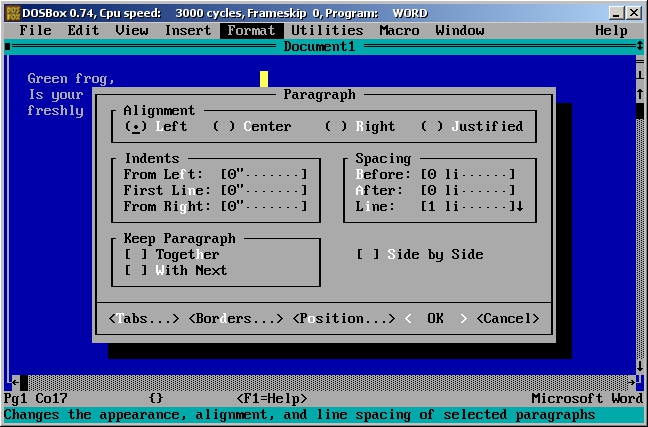
Microsoft Word 5.5 ... for DOS

    Microsoft Word 5.5 was released sometime ago. It was supposed to be a Y2K fix, just an update really. What Microsoft did instead was release the entire application for download with no restrictions, for free.


    As you can see, there really isn't much to it. So why would anyone in their right mind want to use 25 year old software? They wouldn't. However, most writers of fictions are probably not in their right mind, otherwise they would be accountants or something else with a stable pay check. For writers of fiction, this could be something great. 

    Word for DOS can be run in a program call "DOSBox". It can also be run in a Virtual Machine that is running DOS. These options would, on the surface anyway, seem to give you some advantages. You could enjoy sharing folders with a much newer operating system such as Windows 8, Ubuntu or even osX. You could have multiple copies open at the same time, each in its own window, doing its own thing. You could have research right along side what you are writing about. 

    But every major word processor for every new operating system, already does all that. So why use an antiquated version that is no longer supported? It is the ultimate in distraction free writing, that's why. 

    The best way to use Word for DOS, is by running DOS. Booting your computer into DOS forces you to use one application at a time. No task switching. Also, no interruptions by Facebook or email programs. 

    Of course, you probably don't have a floppy drive installed and booting from a live cd sounds good, until you need to save what you are writing. So what then is there to do? Create a bootable USB stick. Amazingly, SD Cards also work for this. In an upcoming post I will walk you through creating such a thing, and even provide a downloadable image you can use to create your own. 

    Once you boot into DOS, you will get a simple command prompt. Just type the word "word" and you are in. There is no font selection, there is only one font, pica. Even then that is the "printed" font. The font you see is called "system" and it is a fixed width font. 

    You can change some colors, and I suggest you do. You may be staring at this screen a lot. All I changed was the background to black, the rest I left alone. Play around with them for a while to get a feel for how it looks and works for you and your taste. 

    The point of such a simple interface is simple. Content creation. You are not publishing you work yet. You haven't even written it yet. You are not setting type face, margins, or any of that. It doesn't matter one little bit. The idea is to get as simple as possible so you can focus completely on the task of putting words to page. Nothing more, nothing less. Just writing. 

    Don't let the all this simplicity fool you though. Word 5.5 for DOS is very capable. It actually has "Windows" of sorts for working with multiple documents, a customizable dictionary and thesaurus. It also doesn't auto-replace or auto-correct anything nor does it auto-capitalize anything. This is a good thing if you are trying to use elvish words in your writing. 

    When you're done with your document, you can save it in one of two formats: RTF and DOC. So far I have opened RTF files in Word 2011 for Mac, Word Viewer for Windows, and Wordpad for Windows all without problems. The problem is the DOC format. If you have Windows and Microsoft Word for Windows you are golden. Simply download the converter and install it. The instructions are inside the self extracting archive. This, however, does not work for Word for Mac. Really though, for writing fiction, how much formatting do you need beyond what RTF will handle? These RTF files also import nicely into Word 2011 for Mac and into Scrivener. 

    If you are looking for the ultimate in distraction free writing, give Word for DOS a try. Really, what have you got to loose? 

Until next time ... 

Sunday, December 9, 2012

A retraction ... of sorts ...

    Yes, it's true. Back in August of this year I posted my disdain for the Linux Desktop environment. In my post titled "Did Linux miss the boat? or did it take the train instead?"I hammered the Linux community for not living up to its potential, for being the ugly kid at the back of the classroom. You know the type, the loner, the kid who plays games in his mom's basement until he's in his mid-thirties. "Those guys".

Sunday, September 2, 2012

The future of the PC

    This post is all about the current state of personal computer. Recently windows domination slipped a few factions of a percentage point, but does it really mean anything to the average user? Does anyone other than the geeks really care? The answer to both of these is probably a big fat "not really". But it is the geeks, nerds and tech-heads that shape and define the digital world for the average user, so perhaps its only fitting that the architects of the future care more than its tenets.

Tuesday, August 21, 2012

Did Linux miss the boat? or did it take the train instead?


    This post is all about Linux. This post is not about Mac vs. PC vs. Linux, or any combination therein. No, this is just about Linux and where I feel it is doing great, still failing, and where I think its headed. At least, where I think it should be headed.

Tuesday, July 24, 2012

DropBox ... FAIL!

    For the last few weeks I have been in a battle, with DropBox.com. The problem started after the latest upgrade, and I have yet to be able to find a way to correct it. After three e-mails to their customer support, I have yet to hear from them. The thing is, it seems to be a more complex problem than it should, or needs to be.

Sunday, June 10, 2012

Rethinking XFDL

    As many of you know, I not only have a MacBook Pro, I also work with XFDL files. As so many people do, I usually work on these files at work on a MicroSoft Windows based PC. I also have a venerable version of the IBM Forms Viewer for osX, but the last time that was updated was in 2006. Many of the newer forms, and incompatibility issues with newer versions of Apple's operating system, crash the aged program. So, I started working on this problem myself.

Saturday, May 12, 2012

Cutting the cable ... revisited

    Yes, I know. It's been a long time since I have made a blog post, and for that I apologize. No, I have not given up on this blog, and yes I still plan to update regularly. If I could make a living running a blog, I would. Still bills need to paid, and with a son in collage those bills add up fast. Work comes first, and unfortunately for the blog, it has paid a heavy price for my absence. After more than a month, i'm back!

Thursday, March 29, 2012

XBMC and Plex Media Server revisited ...

    A little over a week ago I wrote about using Plex and XBMC on the same machine. After having a few days to play around with it I have decided that its time for a revisit to this subject.

Sunday, March 18, 2012

XBMC, Plex Media Server, Airplay and Ubuntu 11.10 ...

     After spending a few days looking for a solution that would fit into my existing setup, I have almost found a solution that works. What I am looking for sounds really simple, the ability to watch any and all of media when and where I want and on the device that I want to watch it on. Due to conflicting standards, closed source software and the restriction of the MPAA this is much harder than needs to be. 

Friday, March 16, 2012

How to add files plex media server on ubuntu 11.10

    It occurred to me, while reviewing some of my previous posts, that I haven't yet covered some very basic "to-do's" about the Plex Media Server. So this post will cover, among other things, how to add files to the Plex Library on Linux.

Tuesday, March 13, 2012

Ubuntu Media Server ... whats next?

    If you have been following my blog, then you already know that I use Ubuntu 11.10 and the Plex media server software as a "Media Center PC". The Ubuntu PC also functions as file server and has two 500GB partitions for Time Machine Backup from my two Mac's. I have also managed to get Netatalk 2.2.2 and Avahi to play nice with the default Samba file sharing software. I wanted to keep Samba available for when friends with Microsoft Windows laptop's came to visit.

    So far, this setup has been working out much better than expected. The server (which is really just plain Jane Ubuntu 11.10 for desktops) is more stable than I could have hoped for and everything integrates well enough into my network that even my "non-techie" wife can use it regularly from her Mac or from the Roku without any trouble. The real question is, where do I go from here?

Sunday, March 11, 2012

Practical Linux ... just my thoughts

    Ever since the early 90's, when I built my first Salckware Linux distribution from source code I have been fascinated with the idea of a free, open-source operating system. When you consider the very idea of an entire planet of free thinking people all coming together, without pay, to make something truly great it staggers the mind. That is, until you really get to the nuts and bolts of it.

Thursday, March 8, 2012

Netatalk on Ubuntu 11.10, one last thing to do ...

    In my last post, I gave a nice (at least I thought so) tutorial on Netatalk 2.2.2 on Ubuntu 11.10 so you can share files and even use Apples' very own Time machine for back up.  Since that writing I have found a couple of things. Really, just one, so this post should be a great deal shorter than the last one, but no less important.

Saturday, March 3, 2012

Setting up Time Machine and Netatalk 2.2.2 on Ubuntu 11.10

    This was the biggest pain to setup and get working that I have yet encountered with Ubuntu 11.10. There is a small mountain information available on the internet on how to do this, yet none if it worked. I followed all of the guides and searched "man pages" for almost two weeks before I found the the proverbial keys to the kingdom. What follows is everything I learned from weeks of trial and error.

Saturday, February 25, 2012

Your smart phone may be your new PC

This is not going to be your typical rundown of who has what, or who does this or that better. No, this is something a bit less ... tangible. It is time for some speculation. Specifically, is Android poised to wipe the virtual walls of the internet with iOS?